An Introduction to Dell Thin Clients for EUC
If you are designing or managing a Virtual Desktop Infrastructure (VDI) or Desktop-as-a-Service (DaaS) environment, the infrastructure in the data center or cloud is only half the battle. The endpoint device your users interact with is just as critical.
Whether your organization relies on Omnissa (formerly VMware) Horizon, Citrix Virtual Apps and Desktops, Microsoft Azure Virtual Desktop (AVD), or Amazon WorkSpaces, this page serves as a foundational guide to understanding thin clients and why Dell Cloud Client Workspace solutions are a staple in the enterprise EUC space.
Why Use Thin Clients with VDI?
A thin client is a lightweight, purpose-built computing device designed specifically to connect to a server or cloud environment where the actual computing happens. Unlike a traditional "fat" PC that relies on local processing power, local storage, and a heavy local operating system, a thin client simply renders the screen and passes keyboard, mouse, and peripheral inputs over the network via display protocols (like Blast Extreme, HDX, PCoIP, or RDP).
So, if the heavy lifting is done in the data center, why invest in specialized endpoint hardware?
- Ultimate Data Security: Thin clients drastically reduce your attack surface. Because no data or applications reside locally, a stolen or compromised physical device yields nothing to bad actors.
- Dramatically Lower IT Overhead: Thin clients eliminate the need to patch individual local applications, manage local antivirus, or troubleshoot OS degradation on thousands of desks. If a device fails, you simply swap the physical box, and the user is back to work in minutes.
- Extended Hardware Lifecycle: Because they have no moving parts (like spinning disks or cooling fans) and require minimal processing power, thin clients can reliably stay on a desk for 5 to 7 years, far outlasting traditional PCs.
- Consistent User Experience: By stripping away local OS distractions and boot delays, users get a fast, appliance-like experience that drops them straight into their virtual workspace.

Dell Pro Micro Thin Client
The Dell Thin Client Ecosystem
Dell recently transitioned their legacy "Wyse" hardware branding to bring their thin clients under their well-known enterprise lines. The result is a unified ecosystem of premium hardware driven by specialized software.
The Hardware
When it comes to Dell hardware for VDI, you essentially have two paths: Dedicated Thin Clients and Leveraged Hardware Solutions.
Dedicated Thin Clients
These are devices purpose-built from the factory to be thin clients, running Dell ThinOS or Windows 11 IoT Enterprise.
- Dell Pro Micro Thin Clients: These are ultra-compact, highly durable desktop endpoints. They feature solid-state memory, no moving parts, and easily mount behind monitors to clear up desk space.
- All-in-One (AIO) Thin Clients (e.g., Dell Pro 24 AIO): Perfect for clean-desk environments, combining the monitor, webcam, and thin computing hardware into a single, aesthetically pleasing unit.
- Mobile Thin Clients (e.g., Dell Pro 14): Laptops that run thin client operating systems, giving remote and hybrid workers secure, mobile access to their virtual desktops without the risk of local data storage.
Leveraged Hardware Solutions
You don't always have to buy brand new, dedicated thin client hardware to get the benefits of Dell's thin client ecosystem. You can leverage existing PC hardware by repurposing it into a secure, easily managed endpoint using Dell ThinOS.
- Non-Dedicated Dell Client Hardware: You can install Dell ThinOS on standard Dell Latitude laptops, OptiPlex desktops, or Precision workstations. This is a great way to extend the life of older Dell equipment that might struggle to run a full modern Windows desktop but has plenty of power to act as a VDI endpoint.
- 3rd Party Hardware: Dell ThinOS is not restricted to just Dell hardware. You can deploy it onto 3rd party x86 devices (like HP or Lenovo PCs). This allows you to unify a mixed-vendor environment under a single operating system and manage it all centrally through Wyse Management Suite.
Operating System Options
Hardware is only as good as the software running on it. Dell offers two distinct operating system paths depending on your management style and broker compatibility needs:
| Feature | Dell ThinOS | Windows 11 IoT Enterprise (LTSC) |
|---|---|---|
| Architecture | Closed, purpose-built for VDI | Standard Windows NT kernel, locked down |
| Security | Zero attack surface, unpublished APIs | Secure Boot, TPM 2.0, Unified Write Filter (UWF) |
| Primary Use Case | Pure VDI, maximum security, kiosk environments | Environments requiring local agents, legacy drivers, or specific peripherals |
| Boot Time | Instant-on (seconds) | Standard Windows boot time |
| Management | Wyse Management Suite (WMS) | WMS, Microsoft Intune, or SCCM |
Centralizing it all with Wyse Management Suite (WMS)
The true power of the Dell thin client ecosystem is how it is managed. Wyse Management Suite (WMS) allows EUC admins to configure, monitor, and update tens of thousands of ThinOS or Windows 11 IoT endpoints from a single pane of glass.
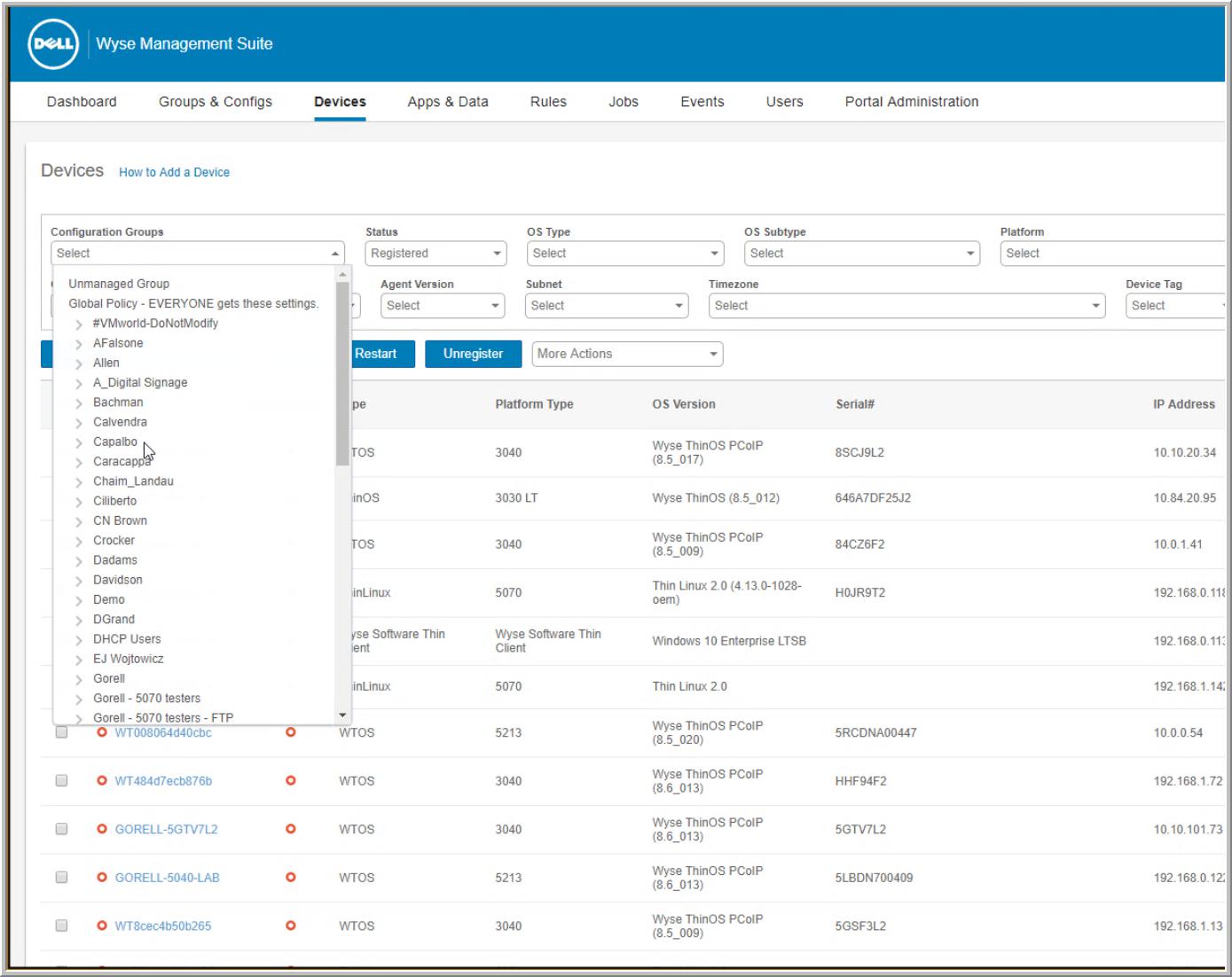
Wyse Management Suite Dashboard
Using a profile-based configuration model, admins can seamlessly assign firmware updates, configure Horizon/Citrix/AVD broker URLs, and manage SSL certificates automatically based on device groups—enabling true zero-touch deployment for IT staff.